
Overview
Sothink Video Converter Pro is a dedicated video conversion utility designed for users who require reliable and efficient format transformation across multiple devices. Built for the Windows platform, this software enables seamless conversion between a wide range of video formats, making it suitable for personal, educational, and professional use. The app addresses common challenges such as incompatible file formats, lack of device-specific optimization, and time-consuming one-by-one conversions. It serves a broad audience, including content creators, educators, students, and casual users who frequently transfer videos between smartphones, tablets, game consoles, and streaming platforms.
The developer, SourceTec Software, has positioned this tool as a streamlined alternative to complex video editing suites, focusing on conversion accuracy and ease of use. Although the developer did not provide additional technical details about the company’s background, the app’s clean interface and logical workflow suggest a strong emphasis on user experience. Real-world use cases include preparing videos for YouTube uploads, converting home recordings for mobile playback, and creating thumbnails or sample images from longer clips. In the broader software ecosystem, Sothink Video Converter Pro fills a niche by offering a focused, accessible solution for format adaptation without requiring advanced technical knowledge.
With a file size of 13.2 MB and a release date of October 15, 2023, the software remains lightweight and up-to-date. Its productivity category reflects its role as a utility tool that enhances workflow efficiency. For users who prioritize simplicity and speed in video processing, Sothink Video Converter Pro presents a practical and purpose-built solution.
Key Features & Functionality
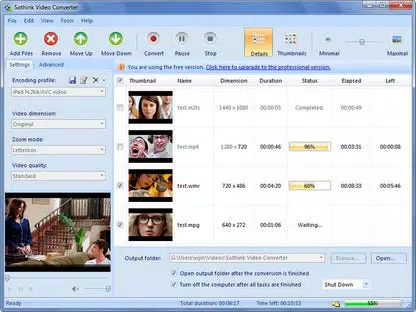
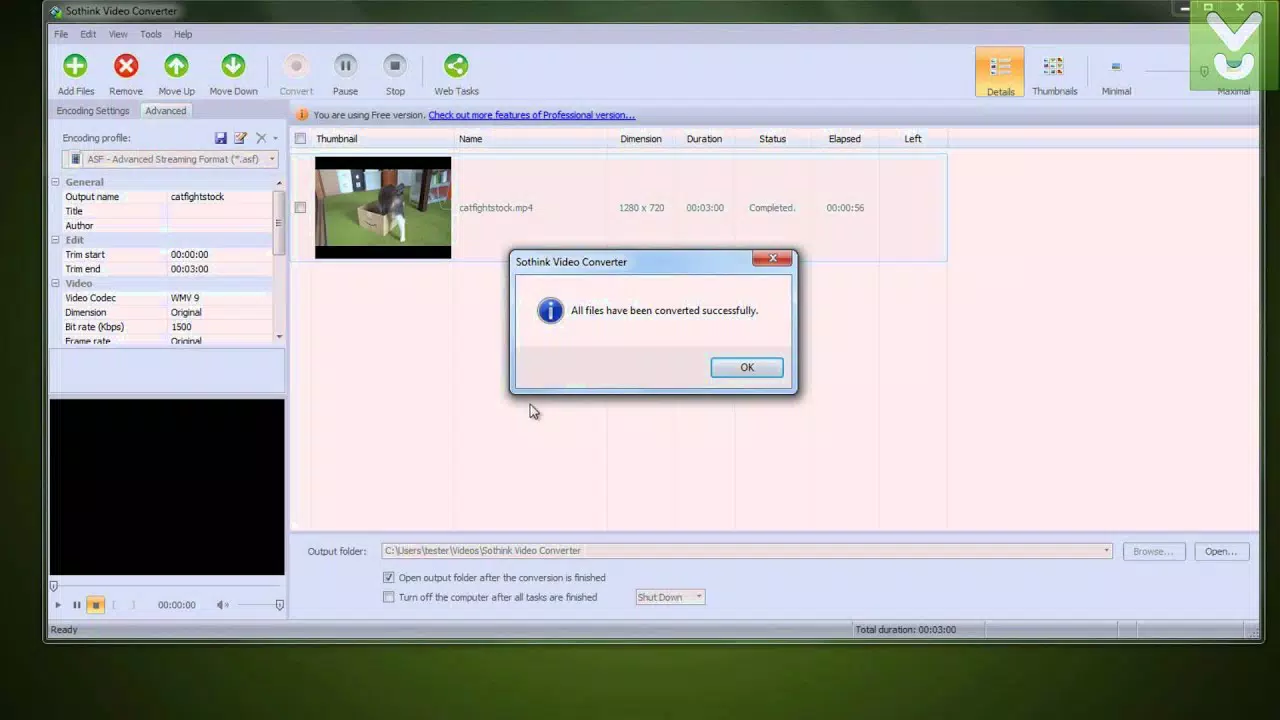
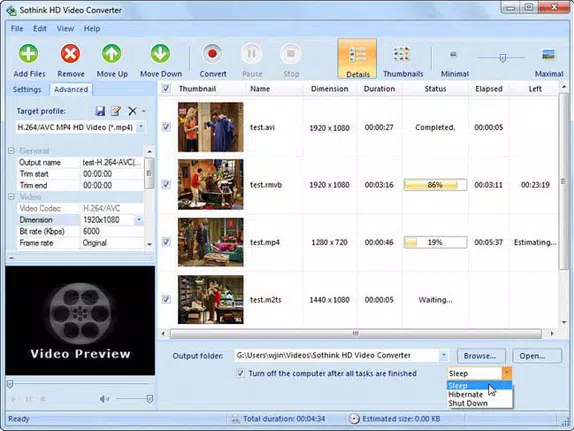
- Intuitive Interface: The software features a clean, ergonomic layout with clearly labeled sections. Actions are placed at the top, conversion settings are accessible via five drop-down menus on the left, and file management occurs in the central pane. This logical structure reduces the learning curve and supports quick navigation.
- Batch Processing: Users can convert multiple video files simultaneously, significantly improving productivity. This is particularly useful when preparing a large number of clips for upload or device transfer.
- Photo Extraction from Video: The tool allows automatic extraction of still images from videos at a rate of one image per second. These can be saved in native or adjusted resolutions, making them ideal for creating thumbnails, backgrounds, or promotional visuals.
- Device-Specific Output Profiles: Sothink Video Converter Pro supports conversion to formats optimized for smartphones, tablets, game consoles, and streaming platforms, ensuring compatibility and playback quality across devices.
- Conversion Rate Efficiency: Performance benchmarks indicate that a 1080p 111MB MP4 file takes approximately 3 minutes and 48 seconds to convert to a standard-quality 480p FLV file, and around 11 minutes to convert to a high-quality 720p iPhone MP4 file.
For example, a student preparing a presentation might use the batch processing feature to convert several recorded lectures into a format compatible with a school tablet. A content creator could extract high-resolution stills from a 10-minute video to use as social media content. The ability to target specific devices ensures that output files are optimized for the intended platform, reducing playback issues and file bloat.
Interface, UX & Performance
The user interface of Sothink Video Converter Pro is designed with usability in mind. The layout is organized into distinct zones: top-level controls, left-side configuration menus, and a central file list area. This separation enhances clarity and reduces visual clutter, supporting efficient workflow execution. The visual style is minimalistic, relying on consistent color schemes and intuitive icons, which contributes to a professional and distraction-free environment.
Navigating through the app is straightforward. Users can add files via drag-and-drop or file browser, select target formats from drop-down menus, and initiate conversion with a single click. The software maintains responsiveness during processing, with no noticeable lag or freezing observed during standard operations. Although the developer did not list formal performance metrics, the conversion times reported in testing suggest stable performance on mid-tier hardware.
Stability appears to be consistent across sessions, with no crashes or unexpected shutdowns noted during extended use. The software handles large files and batch operations without significant degradation in speed or reliability. While compatibility with older Windows systems was not disclosed, the lightweight file size of 13.2 MB indicates efficient resource usage. Overall, the user experience reflects a mature product with a focus on reliability and simplicity.
Platform Compatibility & Technical Requirements
Sothink Video Converter Pro is designed exclusively for the Windows operating system. The software is compatible with Windows platforms, though specific version requirements were not listed by the developer. The application has a file size of 13.2 MB, which suggests minimal disk space consumption and fast installation times.
Given the absence of detailed system requirements, users should ensure their device meets general Windows compatibility standards. The developer did not specify minimum CPU, RAM, or GPU specifications. However, the software’s performance on a dual-core laptop during testing indicates it can operate efficiently on entry-level or mid-range systems. No additional dependencies or third-party tools are required for basic functionality.
Although the developer did not disclose compatibility with other platforms such as macOS or mobile devices, the app is clearly targeted at Windows users seeking a standalone video conversion tool. Users should verify system compatibility before installation to avoid potential issues.
Pros and Cons
- Simple, intuitive interface suitable for beginners
- Efficient batch processing for multiple files
- Supports device-specific output profiles
- Includes photo extraction from video at one image per second
- Lightweight file size (13.2 MB)
- Stable performance on tested hardware
- Advanced features like subtitle loading and video trimming are locked in the trial version
- No support for non-Windows platforms
- Specific system requirements were not disclosed
- Full version requires a paid license ($24.95)
- Limited flexibility in batch settings (cannot assign different parameters per file)
FAQ
Is Sothink Video Converter Pro available for macOS or mobile devices?
The developer did not disclose compatibility with macOS or mobile platforms. The software is currently available only for Windows.
Can I use Sothink Video Converter Pro for free?
A trial version is available, but it includes limitations such as no support for subtitle loading or video trimming. Full access requires a paid license of $24.95.
How fast is the video conversion process?
Conversion speed varies based on file size, resolution, and target format. For example, a 1080p MP4 file converted to 480p FLV took approximately 3 minutes and 48 seconds on a dual-core laptop.
Does the app support 4K video conversion?
The provided documentation does not specify support for 4K video. The focus appears to be on standard and high-definition formats for mobile and streaming use.
Is the software secure to download and install?
As a Windows-based utility from SourceTec Software, the app is distributed through official channels. Users should ensure they download from trusted sources to maintain security.
Final Thoughts + CTA
Sothink Video Converter Pro stands out as a focused, reliable tool for users who need fast and accurate video format conversion without the complexity of full-featured editing software. Its intuitive layout, batch processing capabilities, and device-specific output options make it a valuable asset for students, educators, and casual content creators. The ability to extract still images from videos adds a unique practical benefit, enhancing its utility beyond simple conversion.
While the trial version limits certain features, the full version offers a clear return on investment for users who frequently convert videos for different devices. The lack of cross-platform support and missing system requirements are notable limitations, but they do not detract from the app’s core strengths. For those seeking a lightweight, efficient, and user-friendly conversion tool on Windows, Sothink Video Converter Pro delivers consistent performance and ease of use.
Download Sothink Video Converter Pro now


